![Create it REAL 2025.png]](https://knowledgebase.createitreal.com/hs-fs/hubfs/Create%20it%20REAL%202025.png?height=40&name=Create%20it%20REAL%202025.png)
Embrace SeatMaker solution
Embrace SeatMaker solution provides the possibility to construct seats with variable hardness areas with smooth and seamless transition between them. These areas are entirely dependent on the needs of the user and can be of any shape, size and depth.
In the illustration below, an example of the possibilities for the different zones is presented. The seat (1) has 6 zones that have different hardness. The frame is hard (2), the sections around the legs have a thin cushioning layer that is soft (3,4), a soft seating area that goes halfway inside the seat (5) and extra hard bottom and side area (6, 7) that have structural properties.
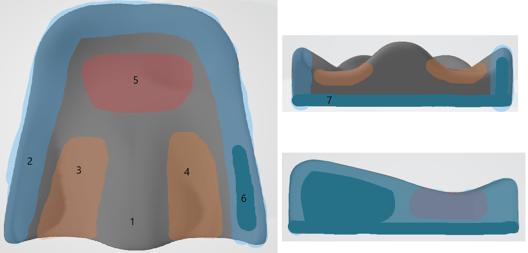
There are 5 types of hardness that can be partially or fully applied to the seat.
|
Hardness |
Purpose |
|
Extra Soft (ES) |
|
|
Soft (S) |
|
|
Medium (M) |
|
|
Hard (H) |
Supporting areas, where only little deformation is accepted
|
|
Extra Hard (EH) |
Structural areas where no compression/deformation is desired
|
How to make different hardness zones
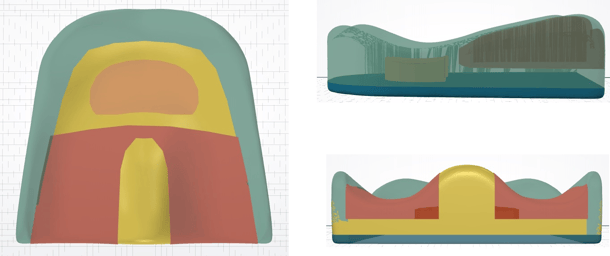
The different hardness zones are defined using Modifiers. These are regular 3D models (STLs) that can be assigned in REALvision embrace to have modifying properties in the overlapping with the seat areas, rather than being objects that will be printed.
SEAT + MODIFIERS
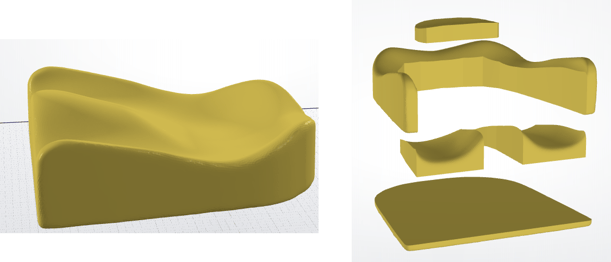
SEAT CONSTRUCTION RESULT
CAD Guidelines
General design requirements
- Design the seat and modifiers as full bodied, closed and watertight 3D models. The software needs to have the full shape of the expected seat. Providing only the top layer scan does not provide enough data.
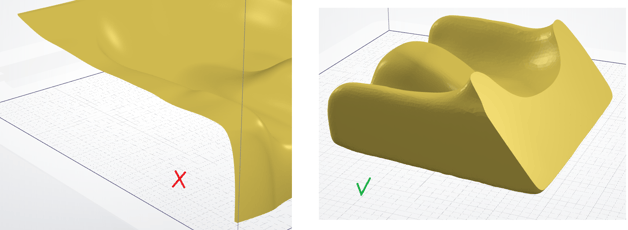
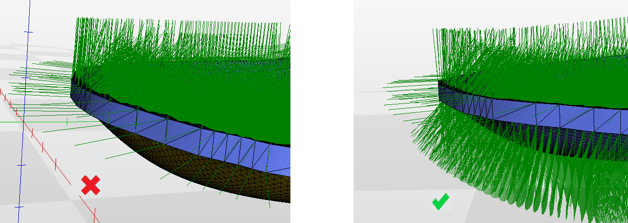
- Design all the files such that all normals of the triangles in the mesh are pointing outwards from the surface of the model
Designing the Seat
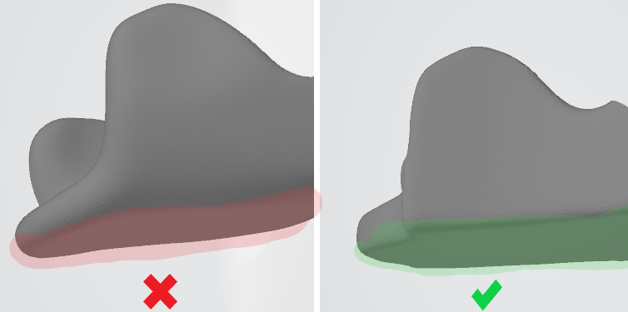
- Design the Seat such that there is a flat surface that can be placed on the printing bed.
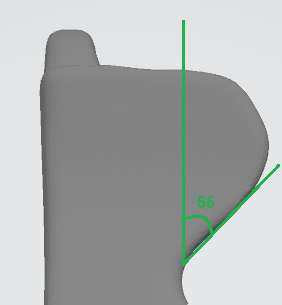
- Avoid overhanging angles above 55o relative to the printing surface of the machine
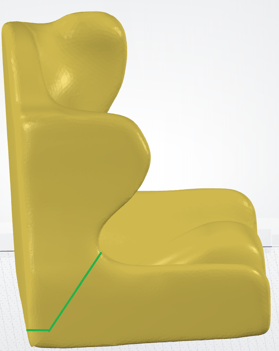
- For whole seats (back and cushion), consider splitting them in two, if the design allows it.
Designing the hardness zones (Modifiers)
- Design the hardness zones as separate models and export as STL.
- In order to have an effect, a modifier zone must have a thickness of minimum 15mm.
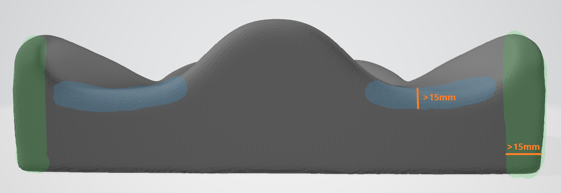
- The modifiers are allowed to be bigger than the area of the seat. Since they have only modifying properties, the areas that are outside the seat will be ignored.
- If possible, design the modifiers and the seat in the same workspace where all objects (seat and hardness zones) have “correct” coordinates relative to each other. Thus, when opening the files in REALvision Embrace the only activity needed will be to click “Align and group models''.
Post processing
After the seat is received, small adjustments to the shape are possible.
Using a heat gun, apply heat to the area that needs adjustments. After several seconds the material will soften. Then apply pressure to deform the shape and let the seat cool down to room temperature.
WARNING: Danger of burns! Use thermal gloves or other equipment that can ensure no direct contact to the skin.
WARNING: This deformation is permanent, therefore it should be performed with extra care.
Printing service notes
- If there are no modifier models provided (as STLs), you can provide a sketch with relative information and Create it REAL will use standard shapes (rectangles, cylinders, etc) to create a zone as close as possible to the presented drawing.
- If no hardness information is provided, the entire seat will be printed with one hardness - Soft.
Features and compliances
A seat printed with Embrace SeatMaker has the following features and compliances:
- “Freeform” hardness zones - the zones can be of any shape, size and location.
- Seamless zone transition - moving from one hardness zone to another is smooth, without hard border lines.
- Breathable - The porous structure of the seat allows for a good air circulation
- Hygienic - A 3D printed seat can be washed, even in the washing machine. Furthermore, it doesn’t absorb moisture and dries quickly
- Durable - even under high pressures, the shape of the seat recovers quickly to its original shape
- Temperature resistant - the hardness of the seat does not change when exposed to different temperatures (up to 100 oC)
- Safe
- Fire safety compliant according to EN 1021-1 and EN 1021-2 standards
- RoHS2 compliant
- No added phthalates
- Irritation and Sensibility compliant (according to EN 10993-10 and 10993-23)